


QuickBooks Workforce
4.78.63K Reviews
App Specs
- Version
- 4.96.1.20260813.2.RELEASE
- Updated On
- License
- Free
- Downloads
- 5,000,000+
- Developer
- Intuit Inc
- Categories
- Productivity
- Platform
- Android, iOS
Screenshots
 Analysis by AppCompare
I think a useful way to judge a payroll companion is to ask what it still does for you after the first few days, when the novelty of a new app has worn off. QuickBooks Workforce makes the most sense as a practical place for employees to check pay information and for teams to keep time-related details close at hand. It is not a general-purpose small-business finance app, and that distinction matters: its value depends on whether your workplace already uses the related QuickBooks tools and gives employees a reason to return.
What the first week feels like
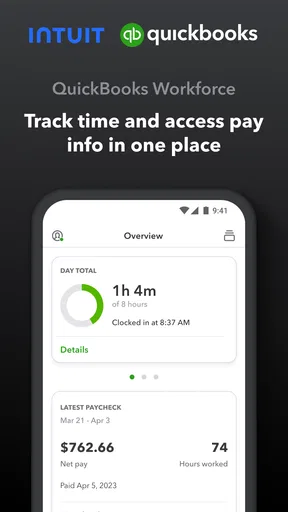
For an employee, the initial appeal is straightforward. Rather than asking a manager to resend a pay document or hunting through old messages, you can use a phone as the first place to look for pay information. That convenience is modest but concrete. It is especially helpful for people who work away from a desk, have changing shifts, or simply prefer to keep work administration separate from personal email.
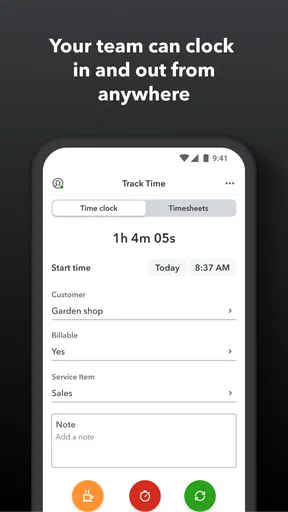
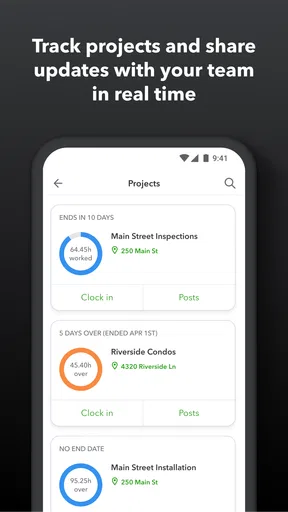
The time-tracking side can also make a routine task easier when a team uses it as part of its existing process. A good first-week test is not whether the app looks polished; it is whether everyone can find the information they need and follow the same clock-in or time-entry routine. If employees and managers agree on that workflow before relying on it, the app has a clearer chance of becoming useful rather than another icon that gets ignored.
Where the recurring value comes from
QuickBooks Workforce is a productivity app from Intuit Inc, and its focus is narrower than the accounting products people may associate with the QuickBooks name. The recurring value is in bringing pay details and time tracking into one employee-facing place. That can cut down on small interruptions: fewer messages asking where a pay document is, fewer separate steps to check work time, and a clearer routine for looking after basic employment information.
It is free to install, and the app is rated for Everyone. It has an average rating of 4.7 from around 62,000 ratings, with more than 5 million installs. Those figures suggest that many people find a use for it, but they cannot tell you whether it will fit your employer’s setup. I would decide based on how your workplace handles payroll and time, not on popularity alone.
Less paperwork, but not a replacement for every tool
Compared with a spreadsheet, a paper pay stub, or a chain of email attachments, an employee app can be more convenient for checking information while away from a computer. Compared with broad payroll or accounting software, though, Workforce is better understood as a companion for employees than as the place an owner should expect to run an entire business. If you need bookkeeping, invoicing, or a full view of business finances, choose a tool designed for those jobs and treat this app as a more focused part of the routine.
That difference is worth settling before you ask a team to adopt it. An employee who only needs to check pay information may find it useful even if they never touch business accounting. A manager, on the other hand, should not assume that installing the app alone will solve payroll administration. Its usefulness depends on the employer’s setup and on how consistently the team uses the relevant process.
Worth Reading Before You Choose

EA SPORTS FC Mobile 26 Is a Bigger Football Game, but It Takes Time

Flipboard Shows What News Apps Must Do Beyond the Feed

Switching to Android Auto Means Rethinking Your Driving Routine

Google Calendar Makes a Crowded Week Easier to Manage

Ludo King Makes the Most of the Minutes Between Plans

Baby Panda World Brings Quick Play to Modern Phones, but Its Game Library Feels Busy
Maintenance and the small points of friction
Any app that becomes part of a work routine needs a little upkeep. Employees need to know which account or workplace setup to use, and they should check that information is current when something changes. A phone app also depends on having a working device and access to the account, so keeping a separate record of where to get help is sensible. These are ordinary habits, but they matter more when someone needs a pay document at short notice.
There can also be a learning curve around responsibility. Employees may be able to handle some information themselves, but that does not mean every pay or time question is theirs to fix inside the app. When something looks wrong, the useful next step is to make a note of the issue and contact the appropriate person at work rather than repeatedly changing entries or assuming the app has corrected the underlying record.
Who is likely to keep it installed?
I would recommend it to employees whose workplace already relies on QuickBooks-connected payroll and wants a convenient way to check pay information or follow a time routine. It is also a reasonable fit for small teams that want fewer routine questions to pass through a manager. The app is less compelling for someone whose employer does not use the relevant setup, for a business owner seeking a complete accounting system, or for a worker who strongly prefers to keep work details off a personal phone.
QuickBooks Workforce first appeared on October 1, 2013, and the current version is 4.90.2.20260518.1.RELEASE. It requires Android 9 or later. Those details are useful when checking device compatibility, but long-term usefulness still comes down to the everyday fit: does your workplace use it, and does it save you a step you regularly take?
A practical long-term verdict
Have you ever found yourself tangled in the mess of managing a small business’s finances? Trust me, you’re not alone. With all the invoices, payroll, and expense tracking, it can feel like you’re drowning in a sea of paperwork. That’s where QuickBooks Workforce comes to the rescue! This handy app is designed to streamline and simplify financial management, making life a whole lot easier for small business owners.
Getting Started with Ease
If you’re like me and dread the thought of setting up new software, QuickBooks Workforce will be a pleasant surprise. The app is available on both Android and iOS, and the installation process is a breeze. You’ll be up and running in no time, ready to dive into its user-friendly interface.
The first thing you’ll notice is how intuitive everything feels. The dashboard is clean and straightforward, giving you access to all the essential features without feeling cluttered. Whether you’re tech-savvy or not, navigating through the app is a walk in the park.
Features That Make Life Simple
Let me tell you, the features in QuickBooks Workforce are nothing short of a lifesaver. For starters, the payroll functionality is top-notch. It allows you to manage employee salaries, track work hours, and even handle tax deductions with just a few taps. Gone are the days of double-checking numbers and worrying about compliance errors.
Then there’s the expense tracking. Oh boy, do I love this part! You can snap photos of your receipts, categorize expenses, and keep an eye on where your money’s going. It’s like having a personal accountant in your pocket. Plus, the integration with QuickBooks Online means everything syncs seamlessly, so your books are always up to date.
I’d add one important caution for anyone deciding whether that description matches their needs: pay, time, receipts, expenses, and company books are different tasks, even when they sit under a familiar product name. Before building a routine around any of them, check what your employer actually expects you to use in this app. For an employee, the most dependable habit is to review the relevant pay or time information and report discrepancies through the workplace’s usual channel. For an owner, the practical question is whether the business tools already in use cover the accounting work; a workforce app should not be treated as a substitute for that broader system.
Empowering Employees
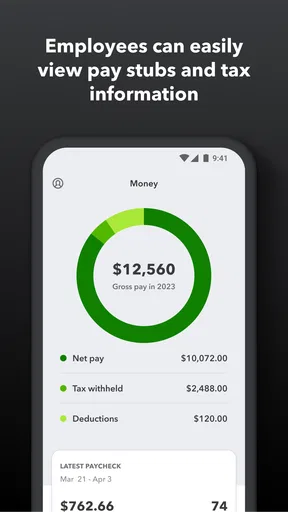
I can’t forget to mention how empowering this app is for employees. They can access their pay stubs, tax forms, and other vital information directly through the app. This transparency not only builds trust but also saves you the hassle of constantly answering payroll-related questions.
The self-service aspect extends to updating personal information, which employees can do without having to go through HR. It’s a win-win situation for everyone involved.
A realistic use case is a worker checking a pay document during a break, then comparing it with their own record of hours before contacting a manager about a specific discrepancy. That is more useful than treating the app as a place to settle a complicated payroll question by guesswork. A supervisor can help the team by explaining which information employees should check themselves and which corrections must go through the employer. Clear boundaries keep self-service convenient without making workers responsible for decisions they are not authorized to make.
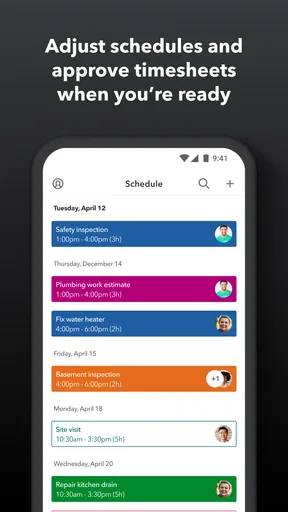
For teams with variable schedules, consistency is more valuable than checking the app constantly. Agree on when time should be recorded and when employees should review it; then use the app as part of that established routine. If one person enters time one way and another follows a different process, a digital record can still create confusion. The app can support an agreed workflow, but it cannot replace the agreement itself.
Security and Support
Now, I know what you're thinking: "What about security?" Rest assured, QuickBooks Workforce takes security seriously. With bank-level encryption and regular updates, your financial data is safe from prying eyes.
And if you ever find yourself in a pickle, the customer support is stellar. Whether you prefer chatting online or talking to a real human on the phone, help is just a click or call away. They’re super friendly and always ready to assist.
I would still keep a simple personal checklist: use the account connected to your workplace, protect access to your phone, and know who at work handles payroll questions. That is not a knock against the app; it is sensible for any tool that puts employment information on a device. If a screen does not match what you expect, pause and verify the details with the relevant workplace contact instead of assuming that a refresh or another entry will resolve it.
When the habit sticks—and when it doesn’t
The app’s main source of fatigue is also its main limitation: it is useful when the employer’s process makes it useful. If your workplace communicates pay details another way, rarely uses time tracking, or has not established a clear employee workflow, installing another app may add one more login without removing any existing steps. In that situation, a familiar payroll portal or a direct conversation with the payroll contact may be simpler.
It is also not the right choice for someone who wants one mobile app to manage every part of a business. Broad accounting software or a spreadsheet may suit an owner’s bookkeeping needs better, while Workforce is oriented toward employee access and work-related routines. Conversely, employees who regularly need to check pay information can find a focused app more convenient than searching through email or waiting for a manager to send a document again.
To judge whether it deserves a lasting place on your phone, give it a practical trial tied to an actual work cycle: check whether you can reach the information you need, whether the time process is clear, and whether using it removes a repeated interruption. If those benefits show up in normal weeks, keeping the app is easy to justify. If you seldom need it or your employer’s setup does not support your tasks, there is little reason to force a daily habit.
Final Thoughts
So, is QuickBooks Workforce worth your time and money? Absolutely! It’s a comprehensive tool that’s perfect for small businesses looking to streamline their financial operations. With its user-friendly interface, robust features, and excellent support, it’s no wonder so many entrepreneurs swear by it.
If you’re tired of juggling spreadsheets and stressing over finances, give QuickBooks Workforce a try. You might just find it to be the best business decision you’ve made in a while. And let’s be real, who doesn’t want a little less stress in their life?
My more measured recommendation is that it earns its space when it answers a recurring employee need, not simply because it carries the QuickBooks name. If your employer uses it for pay information and time, the convenience can outlast the first-week novelty. If you are choosing a tool for bookkeeping, invoices, or comprehensive payroll management, look for a solution built around those responsibilities instead. That distinction makes this a useful, focused workplace companion rather than a universal answer to business administration.
Pros
- User-friendly interface
- easy to navigate.
- Secure access to pay stubs and W-2s.
- Real-time updates on paycheck details.
- Mobile access for on-the-go employees.
- Integrates well with QuickBooks software.
Cons
- Requires internet for full functionality.
- Limited features without QuickBooks integration.
- Notifications can be inconsistent.
- No offline access to documents.
- Some features require manual updates.
FAQs for QuickBooks Workforce
What is QuickBooks Workforce, and how does it benefit employees?
QuickBooks Workforce is an employee-facing app that allows individuals to access their pay stubs, W-2s, and other payroll information conveniently online. This app benefits employees by providing easy access to their financial records anytime, reducing the need for physical paperwork and enhancing communication with employers regarding payroll details.
Is QuickBooks Workforce secure for managing personal financial data?
Yes, QuickBooks Workforce utilizes robust security measures to protect personal financial data. It employs encryption and secure login protocols to ensure that sensitive information such as pay stubs and W-2s are only accessible by authorized users, thereby maintaining confidentiality and reducing the risk of data breaches.
Do employees need a QuickBooks account to use Workforce?
Employees do not need a separate QuickBooks account to use Workforce, but they must receive an invitation from their employer. Once invited, they can set up their Workforce account using their email address, allowing them to access their payroll information directly from the app without needing additional QuickBooks credentials.
Can QuickBooks Workforce be accessed on both Android and iOS devices?
Yes, QuickBooks Workforce is available for both Android and iOS platforms. The app can be downloaded from the Google Play Store for Android devices and the Apple App Store for iOS devices, ensuring accessibility for employees regardless of their smartphone preference. This cross-platform availability makes it convenient for a diverse workforce.
How does QuickBooks Workforce integrate with QuickBooks Online Payroll?
QuickBooks Workforce integrates seamlessly with QuickBooks Online Payroll, allowing employers to share payroll data directly with employees. When employers run payroll through QuickBooks Online, employees receive notifications and can view their pay stubs and tax documents in real-time through Workforce, streamlining payroll management and communication.


